
What is MusicRemover.ai
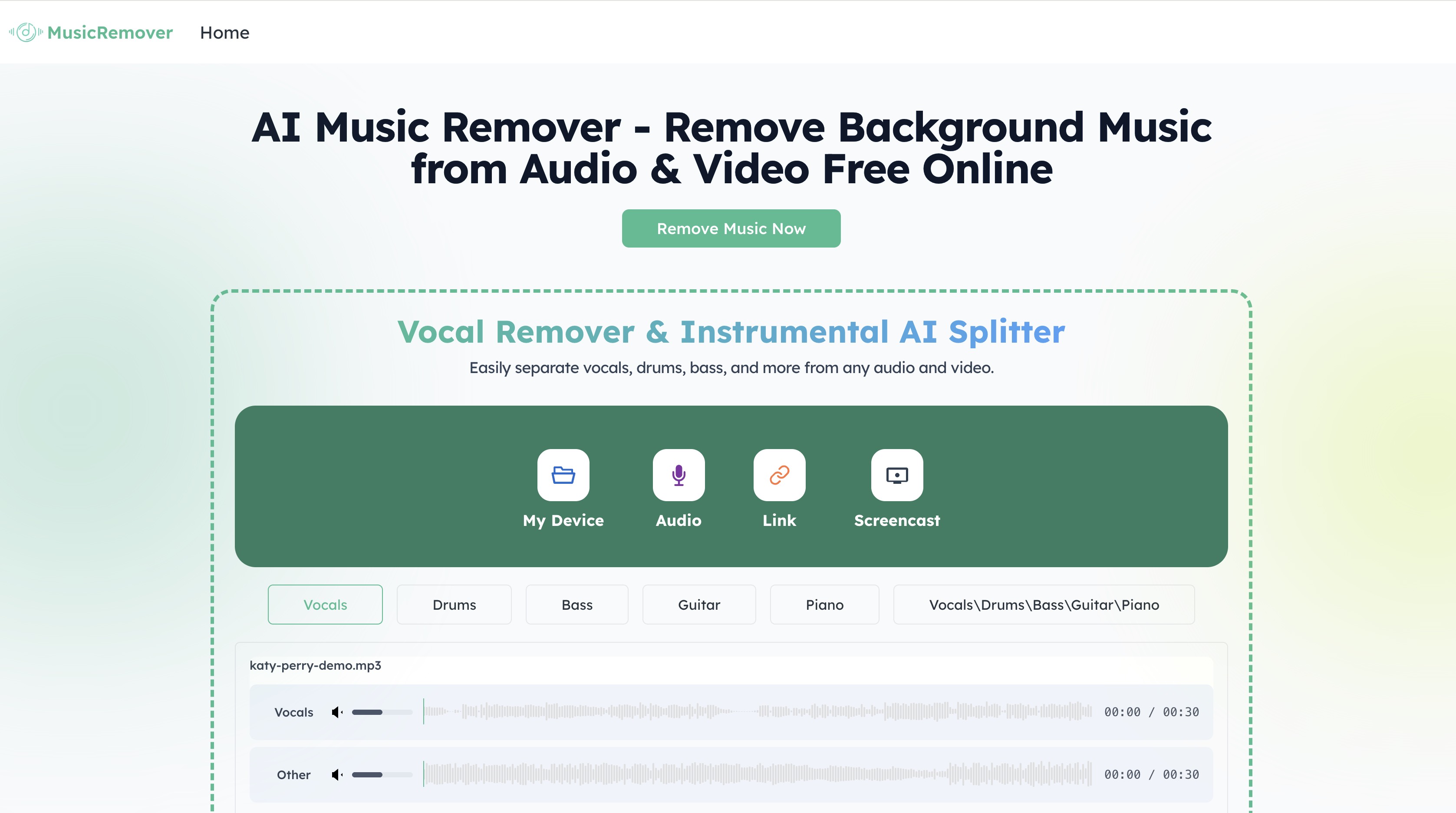
MusicRemover.ai is an AI-powered music remover and vocal/instrumental splitter that helps you separate vocals, drums, bass, guitar, piano and more from any audio or video file directly in your browser. It is designed for creators, podcasters, educators and musicians who need to remove background music from songs, MP3s, podcasts or social videos while keeping speech and vocals clear and natural. With automatic processing, multi-track separation and no software installation, MusicRemover.ai streamlines common audio cleanup and preparation tasks into a simple web-based workflow.
How to use MusicRemover.ai
Open the MusicRemover.ai website
Visit the MusicRemover.ai homepage in your desktop or mobile browser. The tool works on major browsers and supports both computer and smartphone access.Choose your input source
On the main interface, select how you want to upload your media:- “My Device” to upload audio or video files stored locally on your computer or phone
- “Audio” for dedicated audio uploads such as MP3, WAV, or other supported formats
- “Link” if the product allows processing via online URLs (for compatible platforms)
- “Screencast” when you want to capture and process audio from a screen recording
Upload your audio or video file
Click the relevant button, browse to your MP3, song, podcast, interview, lecture, or video file, and upload it. MusicRemover.ai supports multiple audio and video formats commonly used for YouTube, TikTok, Instagram, and other platforms.Select the stems or tracks to separate
After the file is loaded, choose which audio elements you want the AI to isolate:- Vocals for spoken voice or singing
- Drums for rhythm tracks
- Bass for low-end instruments
- Guitar and Piano for harmonic instruments
- “Other” or remaining accompaniment for everything else
You can typically opt for combinations such as Vocals/Drums/Bass/Guitar/Piano depending on your needs.
Start AI background music removal
Initiate processing to let the AI analyze the file. MusicRemover.ai automatically separates the selected components and removes or reduces background music while preserving voice clarity. There is no need for manual waveform editing or complex audio engineering knowledge.Preview the separated tracks
Once processing is complete, use the built-in player to preview:- The isolated vocal or speech track, ideal when you want voice-only audio
- The instrumental or “Other” track, useful for karaoke or backing music
Make sure the output meets your expectations in terms of clarity and balance.
Refine your selection if necessary
If the initial configuration does not match what you want, you can re-run the process by choosing different stems (for example, isolating just Vocals vs. Vocals + Piano) to achieve the best combination for your particular project.Download your processed file
When satisfied, download the resulting audio track(s) to your device. You can save:- Voice-only tracks for podcasts, interviews, and educational content
- Instrumental tracks for karaoke, remixes, or background music
- Multi-stem exports for more advanced editing in a DAW or video editor
Use the output in your preferred tools
Import the downloaded files into your video editor, podcast software, presentation tool, or DAW to complete your content creation. MusicRemover.ai’s clean separation makes it easier to mix, dub, translate, or reuse your audio in new contexts.
MusicRemover.ai's use case
Creators cleaning up social media videos
YouTube, TikTok, and Instagram creators can remove overpowering background music from clips so that voiceovers, commentary, or dialogue sound clearer and more professional.Podcasters and interview hosts polishing recordings
Podcast producers can strip away unwanted music or ambient tracks from episode recordings while keeping conversations natural, ready for distribution across listening platforms.Educators and online trainers refining lecture audio
Teachers and trainers can remove distracting music from lecture videos or screencasts, ensuring students focus on explanations, instructions, and demonstrations.Musicians creating karaoke or instrumental versions
Music hobbyists and singers can remove vocals or lyrics from songs to generate instrumental or karaoke tracks suitable for practice, performance, or remixing.Video editors preparing content for dubbing and localization
Post‑production teams can separate speech from music in existing videos, simplifying foreign‑language dubbing, voiceover replacement, and regional versioning without needing original project files.Businesses and teams standardizing training materials
Organizations can clean up internal training videos, onboarding modules, and recorded meetings by minimizing background tracks while preserving voice clarity for better comprehension.
Benefits of MusicRemover.ai
AI-driven vocal and music separation
MusicRemover.ai leverages advanced AI models to distinguish vocals, drums, bass, guitar, piano, and other elements, enabling precise removal of background music or lyrics without manual editing.Clear voice preservation for professional audio
The system is optimized to keep voice tracks natural and intelligible, which is especially valuable for podcasts, interviews, tutorials, and educational content where clarity is crucial.Browser-based workflow with no installation
All processing happens in your browser, so you do not need to install plugins or desktop applications. This reduces setup time and makes the tool accessible on both desktop and mobile devices.Support for multiple audio and video formats
MusicRemover.ai can handle common file types used across social platforms and recording tools, giving you flexibility to process MP3s, songs, podcasts, screen recordings, and video exports in one place.Fast processing with studio-like results
The AI engine is designed to deliver quick turnaround while still providing high-quality stem separation. This allows creators and professionals to keep their production pipelines efficient.Versatile use across creative and professional workflows
From karaoke creation and remixing to dubbing, translation, and corporate training, the same core AI technology adapts to diverse audio scenarios, making MusicRemover.ai suitable for many different users.Secure and private online handling
Files are processed through a secure browser-based experience, helping protect user content and reducing the need to upload assets to multiple third-party applications.