What is Create a Caricature of Me
Create a Caricature of Me is an AI‑powered photo transformation tool that turns your regular photos into fun, personalized caricatures. By combining face recognition with creative image generation models (including Google Nano Banana, OpenAI GPT‑4o Image, Flux Kontext and others), it keeps your likeness while exaggerating and stylizing features in a cartoon, sketch, anime, or custom style. It’s designed for fast, one‑click caricatures that are perfect for social media avatars, gifts, team profiles and personal branding.
How to use Create a Caricature of Me
Upload your photo
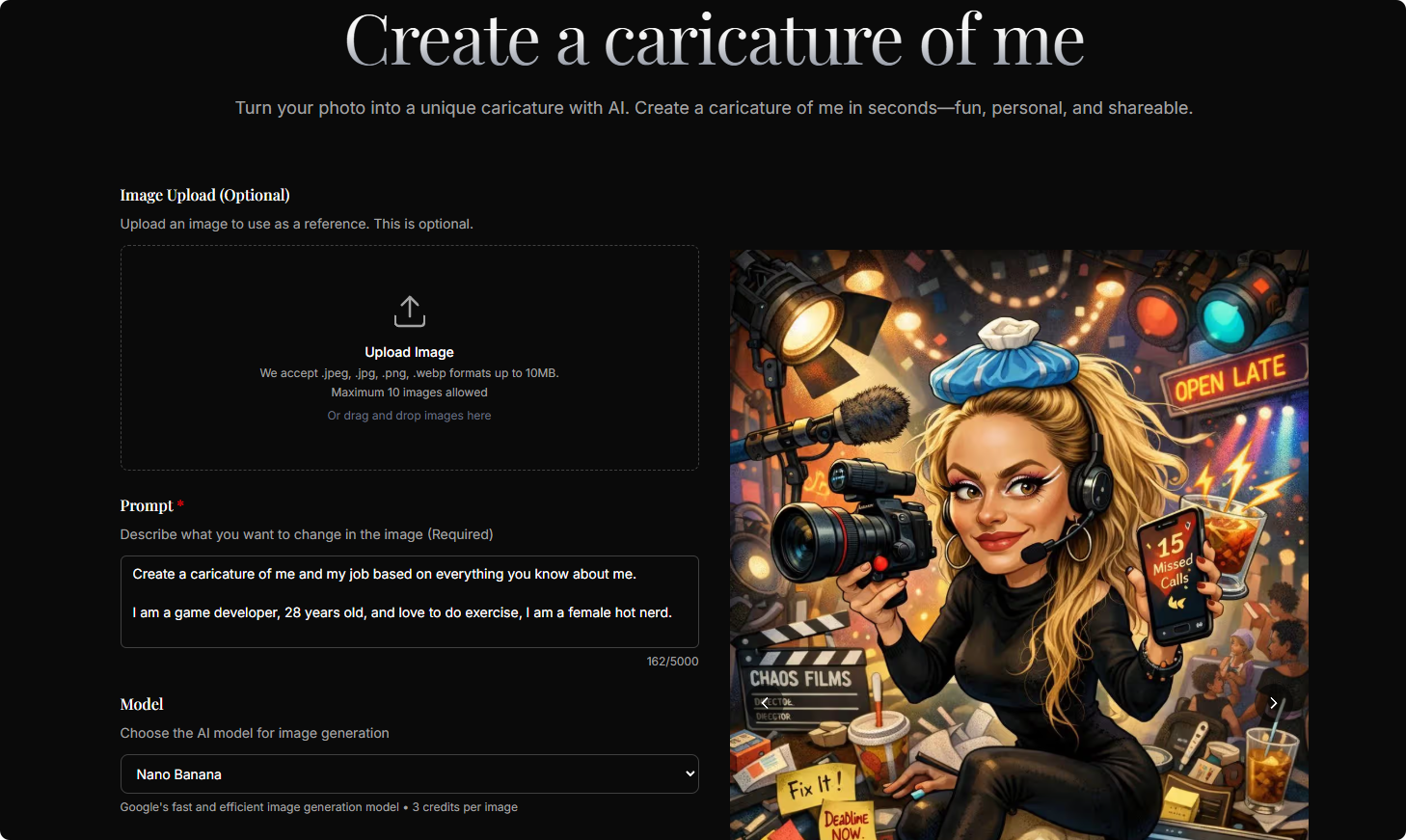
Go to the Create a Caricature of Me homepage and click the upload area. Choose a clear, well‑lit image of your face or full body. Front‑facing or slightly angled portraits work best. You can upload up to 10 images in .jpeg, .jpg, .png, or .webp format (maximum 10MB each).Describe your caricature style in the prompt
In the “Prompt” text box, describe exactly how you want your caricature to look. For example, you can include your profession, hobbies, mood, outfit, background, or art style:- “Cartoon‑style caricature of me as a game developer at my desk with dual monitors”
- “Comic‑book style, bold lines, bright colors, gym background, sporty outfit”
The more specific and vivid your description, the more tailored the result.
Choose your AI model
Open the “Model” dropdown and pick from options like Google Nano Banana, Nano Banana Pro, GPT‑4o Image, or Flux Kontext.- Nano Banana: optimized for fast, efficient generation and quick previews.
- Higher‑end models: better for detailed, polished results when you want the best look.
Select aspect ratio
Choose the aspect ratio that fits your use case:- 1:1 for profile avatars and social icons
- 9:16 for stories and vertical posts
- 16:9 or 21:9 for banners and cover images
- 3:4, 4:3, 2:3, 3:2, 4:5, 5:4 or auto for posters, prints, or flexible layouts.
Pick output format
Select PNG or JPG as your output format.- PNG is ideal when you want higher quality or transparent backgrounds (depending on model support).
- JPG is great for lightweight files and quick sharing.
Generate your caricature
Click the “Generate Images” button. The system sends your prompt and photo to the selected AI model. Within seconds, your caricature images are generated based on your description and settings.Preview, download, and iterate
Review the generated caricatures, download your favorites in high resolution, and reuse or refine your prompt to create alternative styles. You can experiment with different models, aspect ratios, and prompts until you achieve the exact look you want.
Create a Caricature of Me's use case
Social media avatars and profile pictures
Turn a simple selfie into a stylized caricature for platforms like Instagram, X, TikTok, LinkedIn, Discord or gaming profiles. A distinctive caricature helps you stand out while still being recognizable.Personal branding for professionals and creators
Designers, developers, streamers, coaches, and content creators can use caricatures on websites, newsletters, business cards and online communities to present a memorable, on‑brand visual identity.Gifts for friends, family and colleagues
Create playful caricatures from family photos, couple portraits or team photos for birthdays, anniversaries, weddings, graduations and office celebrations. The result works great as prints, cards or digital surprises.Team avatars and company culture assets
Companies can generate a set of caricature avatars for teams, organization charts, internal tools, Slack profiles, event badges, and campaign landing pages while keeping a consistent artistic style.Event posters and invitations
Use caricatures for meetups, conferences, game jams, parties, or sports events. A caricatured host or speaker on the poster instantly adds personality and draws attention.Content for blogs, newsletters and marketing
Creators can incorporate caricatured versions of themselves or their audience into hero images, thumbnails, email headers, and ad creatives to make content more approachable and engaging.Hobby and fandom illustrations
Fans of games, anime, comics, or movies can transform themselves into caricatures that match a specific universe or aesthetic—such as RPG characters, superheroes, or retro cartoons—just by adjusting the prompt.
Benefits of Create a Caricature of Me
Highly recognizable yet creatively stylized portraits
Create a Caricature of Me preserves your core facial features and expressions so people still recognize you, while adding exaggerated proportions, bold lines, and artistic flourishes that make the image playful and unique.Fast results with minimal effort
Instead of hiring an artist or learning complex design tools, you simply upload a photo, type a description, choose options, and generate. The turnaround is measured in seconds, making it easy to iterate and experiment.Multiple visual styles from a single tool
Whether you want a clean vector‑style cartoon, sketch‑like lines, anime‑inspired art, or something more experimental, you can instruct the AI via prompts and models to achieve a wide range of visual directions.Flexible formats for any platform
With support for multiple aspect ratios and PNG/JPG output, caricatures can be tailored for avatars, vertical stories, horizontal banners, print posters, and more without manual cropping or redesign.Scalable for individuals and teams
Because it’s AI‑driven, Create a Caricature of Me can generate many caricatures quickly—from a single personal avatar to a full set for an entire team or community—while keeping style and quality consistent.No design or illustration skills required
The tool is built for non‑designers. Clear guidance, simple controls, and prompt‑driven customization mean anyone can produce appealing caricatures without art training or special software.Great for both casual and professional use
The same caricature engine can create fun, playful images for social media as well as polished, on‑brand visuals suitable for professional profiles, portfolios, and marketing campaigns.