
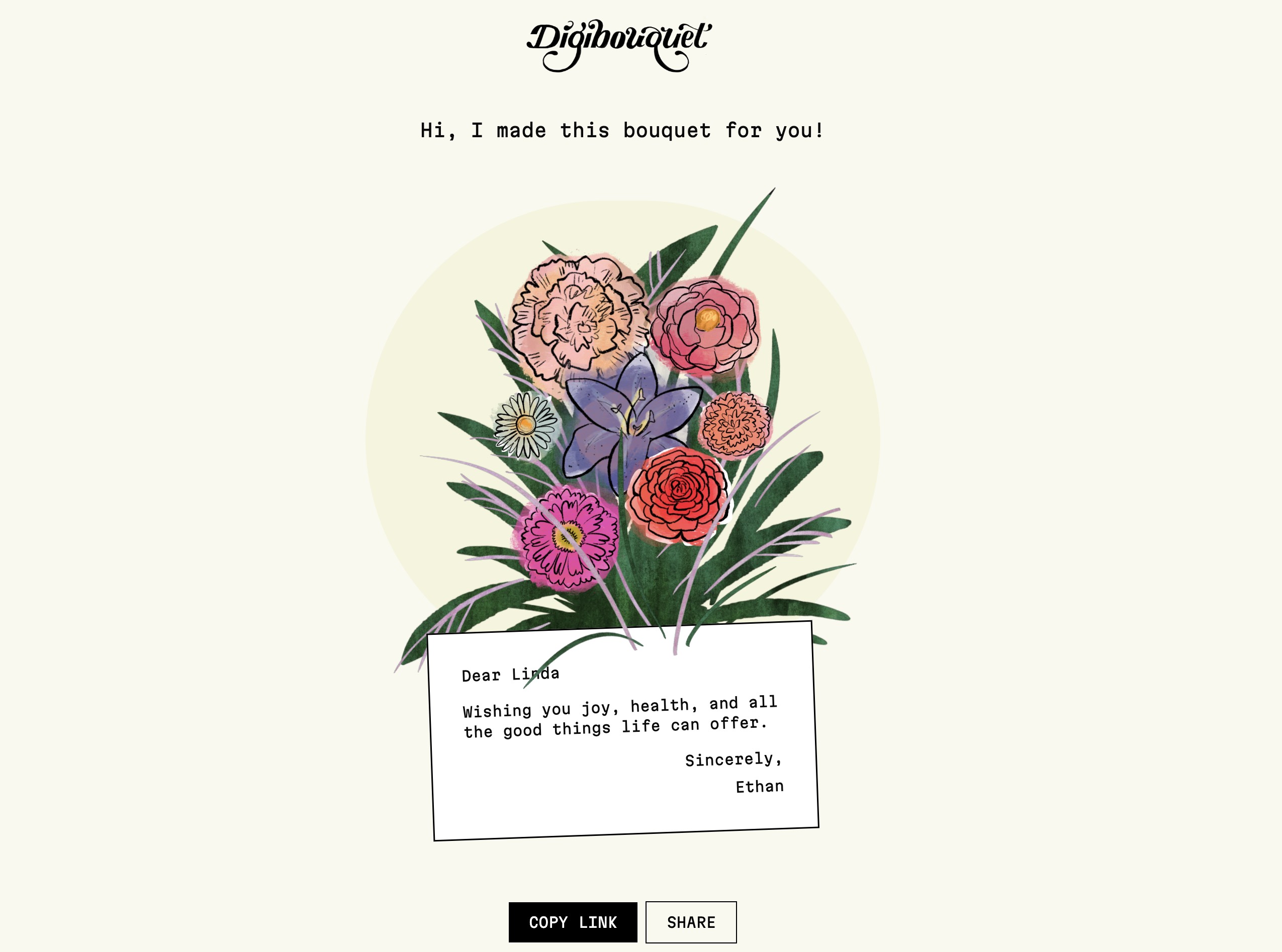
What is digibouquet
digibouquet is a minimalist online tool that lets you create and send beautiful flower bouquets in a fully digital format. Instead of ordering physical flowers, you design a custom bouquet on the website and share it as a link, making it perfect for quick, thoughtful greetings, celebrations, and surprises that arrive instantly in someone’s browser.
How to use digibouquet
Open the digibouquet website
Visit the digibouquet homepage, where you will see options like “Build a Bouquet,” “Build It in Black and White,” and “View Garden.”Click “Build a Bouquet”
Select the “Build a Bouquet” option to start designing a colorful digital flower bouquet. This will take you into the main bouquet builder.Choose your flower style
Browse the available flower graphics (such as peonies and other illustrated blooms) and pick the ones you want to include in your bouquet. Adjust the arrangement by adding, removing, or repositioning flowers as the interface allows.Customize the visual look
Experiment with colors, shapes, and composition so the bouquet matches the mood of the occasion—romantic, celebratory, playful, or elegant. If you prefer a more artistic or minimal aesthetic, consider using the dedicated “Build It in Black and White” option on the homepage instead.Add a personal message (if available)
If the interface provides a text field or caption area, write a short greeting, note, or dedication to the recipient, such as a birthday wish, congratulations, or a simple “thinking of you.”Preview your digital bouquet
Review the final arrangement to make sure the flowers, layout, and message look the way you want. Make any final tweaks before sharing.Generate and share the bouquet link
Once you are satisfied, confirm the design so digibouquet can generate a shareable digital bouquet. Copy the link and send it to your recipient via email, chat apps, social media, or any messaging tool you use.Explore the “View Garden” gallery
Use the “View Garden” option on the homepage to see a curated collection of existing digital bouquets. This can give you inspiration for colors, arrangements, and styles before you design your own.
digibouquet's use case
Digital greetings for special occasions
Use digibouquet to send a bouquet for birthdays, anniversaries, graduations, or other milestones when you want a quick, charming way to say “congratulations” or “happy birthday” without arranging physical delivery.Last-minute celebrations and apologies
When you are short on time or distance makes it hard to send real flowers, a digibouquet design can be shared instantly as a thoughtful gesture for celebrations, apologies, or “just because” moments.Remote relationships and long-distance connections
For friends, partners, and family who live far away, a digital bouquet is an easy, heartfelt way to show you care, especially when coordinating shipping across borders is difficult.Minimalist and eco-conscious greetings
People who prefer digital, less wasteful ways of expressing affection can use digibouquet instead of physical cards and bouquets, aligning with a more sustainable, low-clutter lifestyle.Creative gifts for designers and art lovers
The illustrated, design-forward style of digibouquet makes it a fun way to send visually interesting greetings to people who appreciate digital art, illustration, or unique online experiences.Team celebrations and workplace shout-outs
Share a bouquet link in team chats or company channels to celebrate achievements, welcome new colleagues, or mark office events in a light, delightful way.
Benefits of digibouquet
Instant delivery across any distance
Because each bouquet is a digital creation shared via link, recipients can view it immediately, no matter where they are in the world, without worrying about shipping times or delivery windows.Highly shareable and link-based
digibouquet bouquets are easy to share through email, messaging apps, and social platforms, making them ideal for modern communication habits and online communities.Creative, customizable floral designs
The bouquet builder gives you the freedom to mix different illustrated flowers, colors, and layouts so every bouquet feels personal and tailored to the occasion and the recipient.No logistics or maintenance required
There is no need to handle delivery services, addresses, or flower care. Once the bouquet is created, it simply exists as a digital experience that always looks fresh.Great for minimalist and digital-first lifestyles
People who live in small spaces, travel frequently, or prefer digital keepsakes can enjoy a bouquet that takes up no physical space while still capturing the emotional impact of giving flowers.Inspiration through the “View Garden” gallery
The garden view helps users discover creative examples from existing digital bouquets, lowering the barrier to starting and sparking new design ideas for their own creations.Works beautifully in different visual styles
With both standard colorful bouquets and the “Build It in Black and White” option, digibouquet can match different aesthetics—from playful and vivid to minimal and monochrome—so you can express the exact tone you want.